Modifying Existing Transform Logic
This page describes the steps and recommendations for adding new transforms into existing transforms.
Adding Transforms In Between Existing Transforms
Transforms can be added easily in between existing transforms.
- Drag a new transform onto design surface.

- Either delete the existing connector, linking the two existing transforms OR reconnect the head to the new transform.

- Add a new connector, connecting the tail to the new transform and the head to the existing transform.

Schema Consistency check
Transforms which are already configured can be reconnected if:
Transaction Type / Record Differences
If the two nodes have different transaction types i.e. a mismatch between transaction levels (hierarchical vs flat) OR ids are different the connection an error will be displayed and the reconnection will fail.
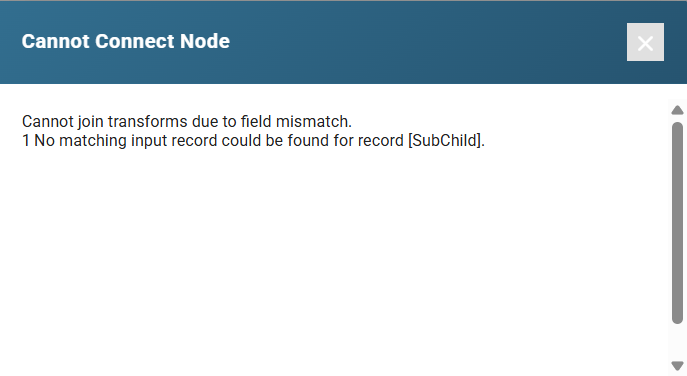
Field Differences
Assuming consistent transaction types / records, any field differences between the transforms (re-)connected will display a confirmation to accept the automatic add or deletion of fields.
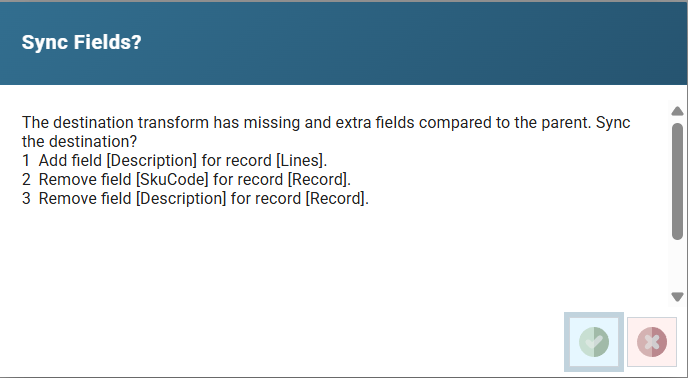
In the screenshot of example above:
- The Description field on the Lines record exists on the parent transform and will be added to the child (and any children) transforms.
- The SkuCode and Descriptions on the 'Record' record do not exist on the parent transform, but do exist on the child transform. If reconnected these fields will be deleted from the child and subsequent children transforms.
Task Transforms
Task transforms which are either unconnected or connected at the start of an integration can be moved so it is a child of a transform with transaction types.

Making Changes to an Integration
Transforms may be inserted, removed and re-ordered at any time. However, there are different requirements for re-ordering configured and non-configured transforms:
Non-configured Transforms
Transforms which have not yet been configured can be re-ordered anywhere, as they inherit the transaction types and data fields from their parent transform.