Decisions
Decisions control the execution flow of a script or one of its sections with one or more conditional statements.
decision making statements
if statement
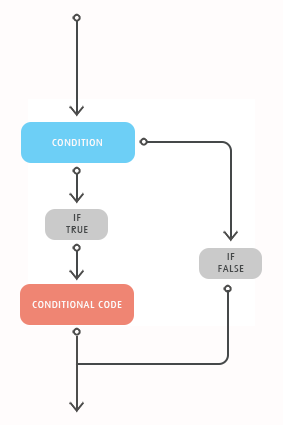
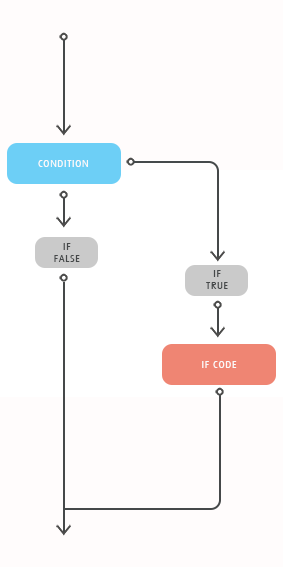
An If statement consists of a boolean expression followed by one or more statements. If the condition is said to be True, the statements under If condition(s) are Executed. If the Condition is said to be False, the statements after the If loop are executed.
Syntax
The syntax of an If statement in VBScript is:
If(boolean_expression) Then
Statement 1
.....
.....
Statement n
End If
Flow Diagram
Example
Dim a
Dim b
Dim Result


a = 20
b = 10

If a > b Then
  Result = "a is Greater than b"
End If

Result
When the above code is executed the value of the Result variable is the string: "a is Greater than b"
if…else statement
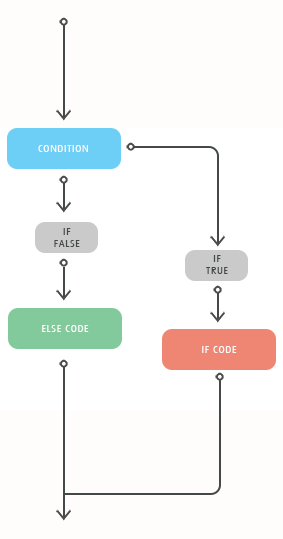
An If statement consists of a boolean expression followed by one or more statements. If the condition is said to be True, the statements under If condition(s) are Executed. If the Condition is said to be False, the statements under Else Part would be executed.
Syntax
The syntax of an if statement in VBScript is:
If(boolean_expression) Then
Statement 1
.....
.....
Statement n
Else
Statement 1
..... ....
Statement n
End If
Flow Diagram
Example :
Dim a
Dim b
Dim Result

a = 5
b = 25

If a > b Then
  Result = "a is Greater"
Else
  Result = "b is Greater"
End If

Result
When the above code is executed the value of the Result variable is the string: "b is Greater"
if…elseif…else statement
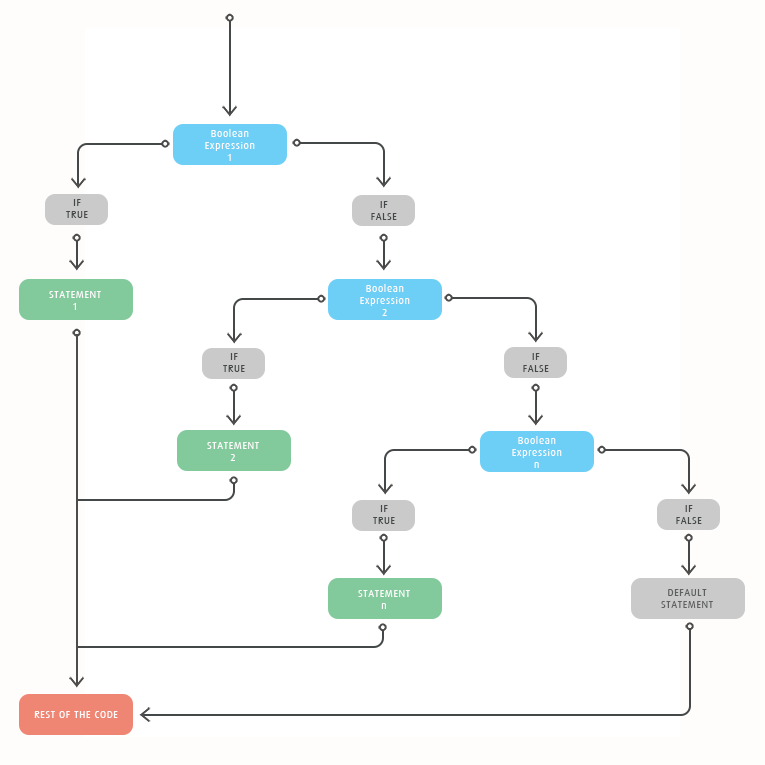
An If statement followed by one or more ElseIf Statements that consists of boolean expressions and then followed by a default else statement, which executes when all the condition becomes false.
Syntax
The syntax of an If-ElseIf-Else statement in VBScript is:
If(boolean_expression) Then
Statement 1
.....
.....
Statement n
ElseIf (boolean_expression) Then
Statement 1
..... ....
Statement n
ElseIf (boolean_expression) Then
Statement 1
..... ....
Statement n
Else
Statement 1
..... ....
Statement n
End If
Flow Diagram
Example :
Dim a
Dim Result

a = -5

If a > 0 Then
  Result = "a is Positive"
ElseIf a < 0 Then
  Result = "a is negative"
Else
  Result = "a is zero"
End If

Result
When the above code is executed the value of the Result variable is the string: "a is negative"
nested if statements
An If or ElseIf statement inside another If or ElseIf statement(s). The Inner If statements are executed based on the Outermost If statements. This enables VBScript to handle complex conditions with ease.
Syntax
The syntax of a Nested if statement in VBScript is:
If(boolean_expression) Then
Statement 1
.....
.....
Statement n
If(boolean_expression) Then Statement 1
.....
.....
Statement n
ElseIf (boolean_expression) Then Statement 1
..... ....
Statement n
Else
Statement 1
..... ....
Statement n
End If
Else
Statement 1
..... ....
Statement n
End If
Example
Dim a
Dim Result

a = 23

If a > 0 Then
  Result = "a is Positive"
  If a = 1 Then
    Result = "The Number is Neither Prime NOR Composite"
  ElseIf a = 2 Then
    Result = "The Number is the Only Even Prime Number"
  ElseIf a = 3 Then
    Result = "The Number is the Least Odd Prime Number"
  Else
    Result = "The Number is NOT 0,1,2 or 3"
  End If
ElseIf a < 0 Then
  Result = "a is negative"
Else
  Result = "a is zero"
End If

Result
When the above code is executed the value of the Result variable is the string: "The Number is NOT 0,1,2 or 3"
switch statement
When a User want to execute a group of statements depending upon a value of an Expression, then Switch Case is used. Each value is called a Case, and the variable being switched ON based on each case. Case Else statement is executed if test expression doesn't match any of the Case specified by the user.
Case Else is an optional statement within Select Case, however, it is a good programming practice to always have a Case Else statement.
Syntax
The syntax of a Switch Statement in VBScript is:
Select Case expression
Case expressionlist1
statement1
statement2
....
....
statementn
Case expressionlist2
statement1
statement2
....
....
statementn
Case expressionlistn
statement1
statement2
....
....
Case Else
statement1
statement2
....
....
End Select
Example
Dim MyVar
Dim Result

MyVar = 1

Select case MyVar
  Case 1
    Result = "The Number is the Least Composite Number"
  Case 2
    Result = "The Number is Neither Prime NOR Composite"
  Case 3
    Result = "The Number is the Only Even Prime Number"
  Case Else
    Result = "Unknown Number"
End Select

Result
In the above example, the value of MyVar is 1. Hence, Case 1 would be executed, the Result variable is the string: "The Number is the Least Composite Number"