Monitors
Monitors have the ability to trigger an integration job when a specific email event occurs, such as an email being received.
Monitors are a more integrated version of the File Events. Monitor setup is defined solely within the Read transform and directly embedded in the integration, whereas the File Events are setup as a separate job that uses the same file path as the integration.
Monitor Setup
Monitors are setup by enabling/disabling them through the File Layout tab of the Read Transform, and the Monitor page found in the Setup tab of the primary navigation strip.
Transform > File Layout
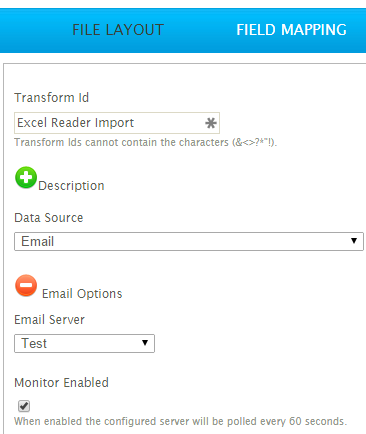
Transform Id
The transform Id of the selected transform.
Data Source
Must be set to Email in order to enable the Monitor.
Email Server
Server for the Monitor to watch.
See POP3 Servers for information on setup.
Monitor Enabled
When selected Monitor is enabled and will appear in the Monitor grid on the Setup tab.